
BMI Calculator
Calculate Body Mass Index, health category, and healthy target weight range with easePage Content
Maintaining a healthy body weight is an essential cornerstone of preventive health and personal fitness. While weight alone does not reveal your overall physical composition, evaluating your weight relative to height provides an objective, standardized starting point for understanding cardiovascular and metabolic health. The BMI Calculator by Spreadsheet123 offers a practical, automated solution to compute your Body Mass Index instantly using standard Imperial or Metric measurements. Designed with clean, accessible spreadsheet architecture, the template translates basic physical inputs into standardized World Health Organization weight classifications while establishing clear, realistic target weight ranges tailored to your stature.
Why Calculating Body Mass Index Matters
Body Mass Index is a universally recognized screening metric used by physicians, healthcare professionals, and fitness practitioners to gauge potential health risks associated with underweight, overweight, and obesity. While BMI does not measure body fat percentage directly or differentiate between dense muscle mass and adipose tissue, it provides a consistent, low-barrier screening assessment across broad adult populations. Documented deviations above or below clinical benchmarks correlate closely with increased risks for hypertension, type 2 diabetes, circulatory stress, and nutritional deficiencies.
Beyond determining your current index score, calculating your target parameters highlights the exact weight spectrum considered healthy for your height. Rather than pursuing arbitrary numbers on a scale, using the Spreadsheet123 BMI template gives you a balanced, objective target bracket to guide sustainable lifestyle adjustments, dietary planning, and exercise routines before consulting your doctor for tailored clinical guidance.
BMI Calculator
for Excel 2007+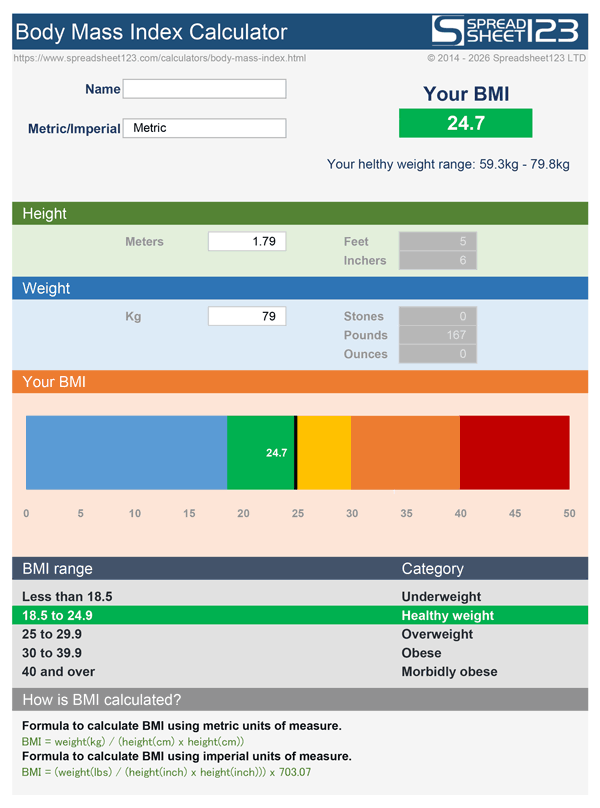

How the BMI Calculator Works
The Spreadsheet123 BMI Calculator features an intuitive layout that supports both Imperial and Metric measurement systems. Users accustomed to feet, inches, and pounds can input their figures directly, while those using centimeters and kilograms can record their metrics without doing manual conversions beforehand. As soon as height and weight are entered, the built-in arithmetic calculates your Body Mass Index instantly, displaying the result rounded to one decimal place.
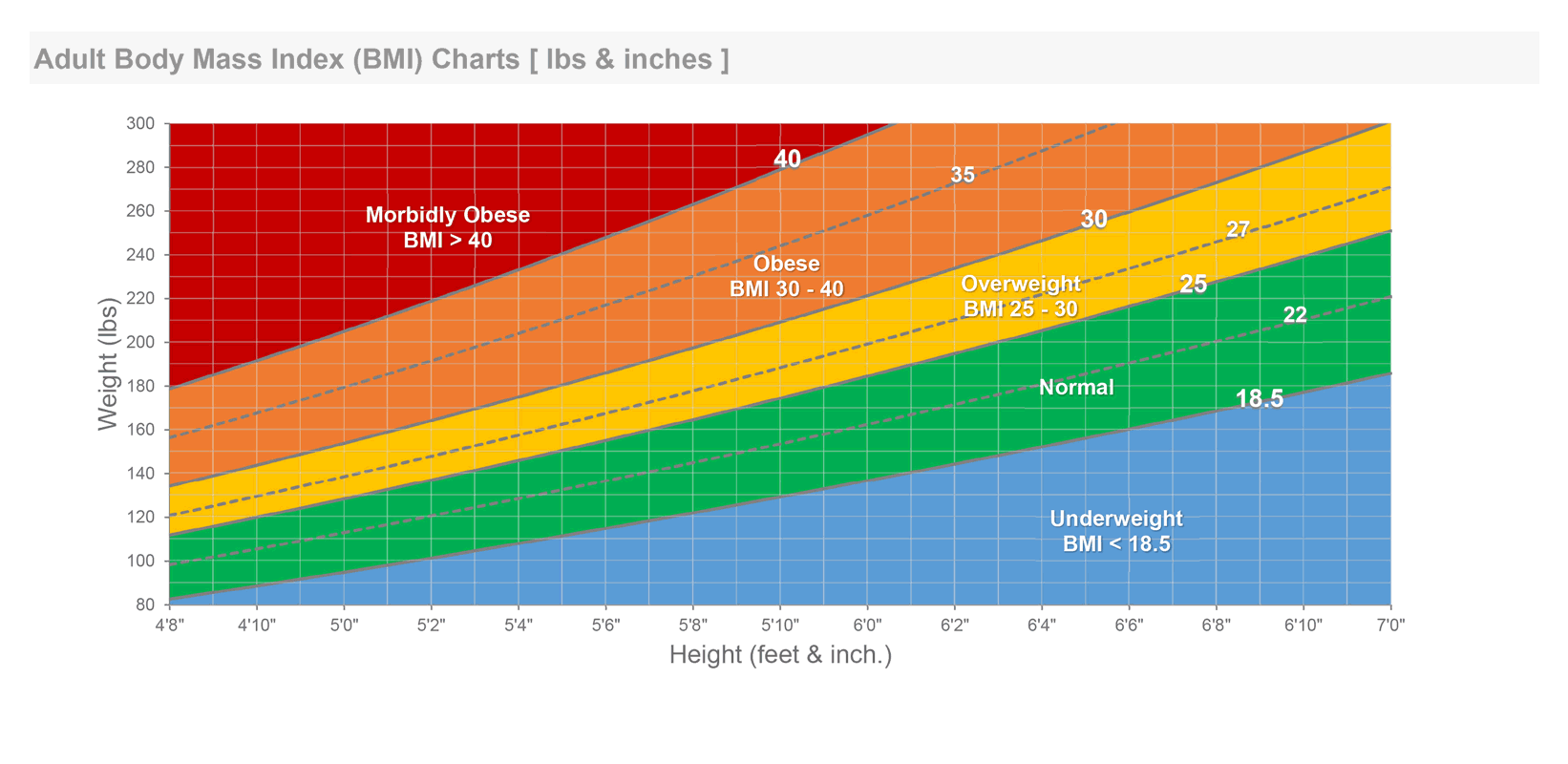
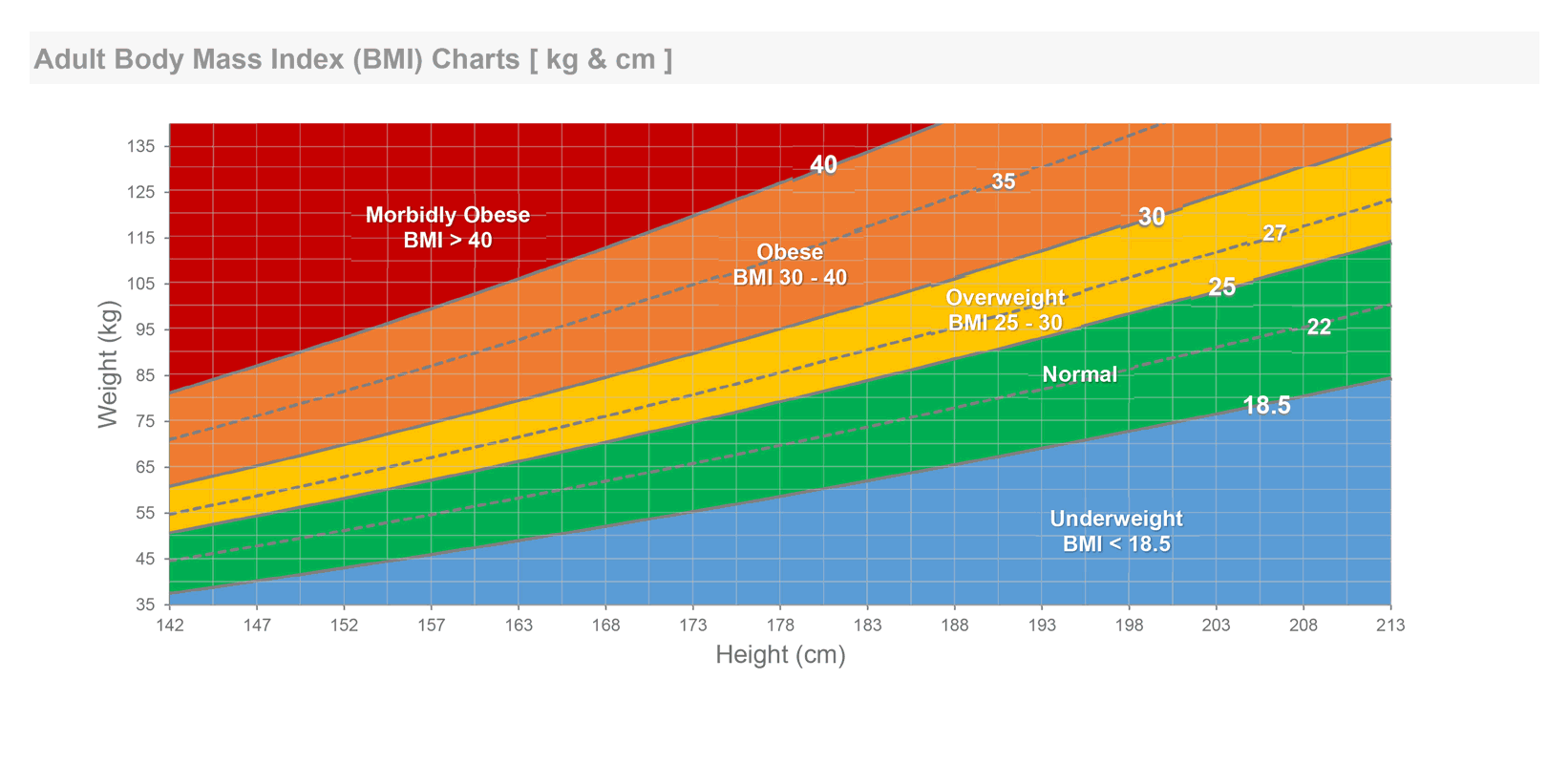
Directly alongside your numerical score, the worksheet categorizes your reading according to official World Health Organization brackets: Underweight (below 18.5), Normal Weight (18.5 to 24.9), Overweight (25.0 to 29.9), and Obese (30.0 and above). The calculator also reverses the primary formula to determine your personal Healthy Weight Range, showing the exact lower and upper boundaries considered optimal for your height so you can easily evaluate where your weight falls relative to the recommended threshold.
A built-in visual reference scale positions your score across the color-coded spectrum for an immediate graphic summary. Built entirely with native spreadsheet formulas and free of macros, the workbook runs reliably across desktop Excel, Excel for Mac, and Google Sheets, printing cleanly on standard letter and A4 paper for personal records or clinical visits.
For the most consistent results, measure your standing height barefoot against a flat wall and record your body weight first thing in the morning before eating or exercising.
Formulas and Calculations Used in the Template
The template relies on established mathematical formulas defined by public health organizations, applying the appropriate conversion logic based on whether you enter Imperial or Metric units.
Metric BMI Formula
When calculating in the Metric system, Body Mass Index equals body weight in kilograms divided by standing height in meters squared:
If height is recorded in centimeters, the worksheet automatically divides that value by 100 before squaring it in the denominator.
Imperial BMI Formula
In the Imperial system, where height is recorded in total inches and weight in pounds, a standard scaling factor of 703 is applied to equalize the ratio:
Total inches are determined by multiplying height in feet by 12 and adding any remaining inches.
Healthy Weight Range Calculation
To identify your target healthy weight spectrum, the template multiplies the lower and upper bounds of the normal BMI classification (18.5 and 24.9) by height squared:
Under Imperial measurement mode, this formula calculates the equivalent weight boundaries in pounds by multiplying the threshold by height squared and dividing by 703.
Step-by-Step Instructions
- Select Your Unit System: Choose between Imperial (feet, inches, pounds) or Metric (centimeters, meters, kilograms) according to your preferred measurement standard.
- Enter Your Height: Input your standing height into the designated input cells, separating feet and inches if using Imperial measurements.
- Input Your Current Weight: Type your current body weight in pounds or kilograms into the weight field to calculate your BMI score immediately.
- Review Your BMI Category: Check your calculated index against the WHO health classifications to determine if your reading falls within the Underweight, Normal, Overweight, or Obese bracket.
- Identify Your Target Weight Spectrum: Note the calculated minimum and maximum healthy weight figures to set realistic, measurable personal wellness targets.
Body Mass Index serves as a general population screening indicator and does not directly assess body fat percentage, muscular build, or bone density. High-performance athletes, pregnant women, and older individuals should consult a qualified healthcare provider for personalized medical assessments.