
Recipe Cost Calculator
Estimate the cost and profitability of your recipe with ease, with this calculatorPage Content
Running a profitable commercial kitchen or food business requires much more than culinary talent - it demands consistent control over food costs and direct preparation expenses. Whether managing a busy restaurant, running a catering service, operating a food truck, or pricing artisan baked goods, knowing the exact production cost of every dish on your menu is essential for protecting your bottom line. The Recipe Cost Calculator provides a practical, structured framework to eliminate guesswork from your menu pricing by tracking individual portion costs, food cost percentages, and net profit margins in one place.
Why Accurate Recipe Costing Matters
In the food service industry, unmonitored ingredient inflation, untracked waste, and portion creep can quietly erode operating margins. While conventional industry benchmarks suggest maintaining an overall food cost percentage between 28% and 35%, achieving this target across an entire menu requires analyzing each recipe on a per-serving basis. Without standardized costing, high-volume menu items are often underpriced, masking situations where sales revenue barely covers raw ingredients and preparation overhead.
Standardizing your recipe costs gives you the data necessary to make informed commercial decisions. It enables head chefs and restaurant managers to pinpoint high-margin signature dishes, identify expensive components that require supplier renegotiation, and design profitable daily specials.
Recipe Cost Calculator
for Excel 2003+, Google Sheets & OpenOffice.org Calc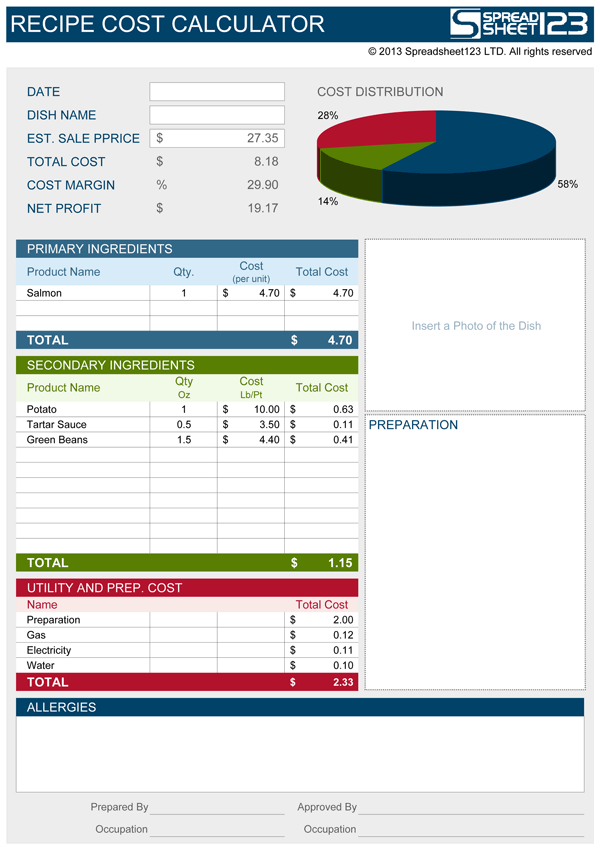
How the Calculator Works
The spreadsheet separates food components into two distinct tiers to ensure calculation accuracy across different inventory types. The Primary Ingredients section handles main, unit-based center-of-plate items, such as a salmon fillet, a cut of steak, or an artisan brioche bun, where the cost is calculated on a per-item basis. Below it, the Secondary Ingredients section is tailored for bulk produce, seasonings, sides, and sauces purchased in volume but used in smaller portions.
To support different regional standards, the template features a built-in switch between Imperial and Metric measurement systems. Changing the unit of measure dropdown automatically updates the column labels from ounces to grams and pounds or pints to kilograms or liters. It also adjusts the underlying conversion formulas by dividing by 16 for Imperial or 1000 for Metric, allowing you to enter small recipe quantities while inputting wholesale bulk purchase prices without manual conversion math.
Beyond raw ingredients, the calculator factors in direct operational expenses. Dedicated rows for preparation labor and kitchen utilities, including gas, electricity, and water, allocate a realistic share of overhead to each individual portion. When you enter a proposed target price into the Estimated Sale Price field, the template instantly calculates the Cost Margin percentage and the net currency profit generated per serving, while an integrated pie chart displays the proportion of expenses across primary ingredients, secondary items, and utilities.
The template also functions as an operational kitchen specification card. You can insert a photograph of the plated presentation, document step-by-step preparation guidelines, record critical allergen warnings such as dairy, gluten, nuts, or shellfish, and log formal preparation and approval signatures to maintain quality and portion consistency across kitchen shifts.
Formulas and Calculations Used in the Template
The template utilizes dynamic formulas to automate unit conversions, total cost aggregation, and profitability analysis. Understanding these calculations helps in maintaining the worksheet and customizing it for specific kitchen requirements.
Secondary Ingredient Unit Conversion Formula
To calculate the cost of secondary ingredients accurately from bulk packaging, the spreadsheet checks the Unit of Measure selection in cell K18 and applies the corresponding conversion factor:
In this formula, cell C28 represents the quantity used in ounces or grams, while D28 is the wholesale purchase price per pound, pint, kilogram, or liter. The conditional divisor converts the bulk price to match the portion unit.
Total Recipe Cost Formula
The total cost in cell C11 sums the subtotal of primary ingredients in cell E23, secondary ingredients in cell E38, and direct utility and preparation expenses in cell E46:
Cost Margin (Food Cost Percentage) Formula
The food cost margin in cell C13 evaluates the proportion of selling revenue consumed by preparation costs:
Net Profit Formula
The net contribution profit in cell C15 subtracts total preparation costs from the estimated selling price:
If you purchase secondary liquid ingredients by the gallon, convert the unit cost to pints by dividing the gallon price by 8 prior to entering it into the price column for accurate Imperial calculations.
Step-by-Step Instructions
- Select the Unit of Measure: Choose Imperial or Metric from the dropdown menu in cell K18 to configure the appropriate measurement units and conversion factors.
- Input Primary Ingredients: Enter each main center-of-plate item in the Primary Ingredients table, specifying the quantity of units per dish and the purchase price per unit.
- Add Secondary Ingredients: Record bulk produce, sauces, and seasonings by entering the portion quantity used, in ounces or grams, along with the bulk purchase price per pound, pint, kilogram, or liter.
- Allocate Labor and Utility Costs: Enter the estimated direct preparation labor cost and allocated utility expenses for gas, electricity, and water required to produce a single serving.
- Set the Target Selling Price: Enter your proposed menu price in the Est. Sale Price cell C9 and review the calculated Cost Margin and Net Profit to verify target profitability.
- Complete the Recipe Specification Details: Insert a photo of the completed dish, check applicable allergen warnings, add preparation notes, and record the preparer and approver signatures.
When updating ingredient prices, review bulk pack sizes regularly from your supplier invoices, as packaging changes will directly influence your calculated plate margin.